The Complete Google Ads Playbook for Dog Groomers
Most dog grooming salons waste 30-50% of their Google Ads budget on clicks that will never convert. After auditing dozens of grooming accounts across the country, we see the same mistakes over and over: no campaign structure, broad match keywords bleeding money, zero negative keywords, and geo-targeting set to Google's default (which serves your ads to people hundreds of miles away).
This guide is the exact framework that consistently delivers $25-30 cost per acquisition for grooming businesses. It's based on real performance data across markets ranging from small towns to major metros.
What This Guide Covers
- Campaign Structure — The 3-campaign framework
- Ad Group Organization — 7 ad groups that cover every search intent
- Keyword Strategy — Match types and keyword counts
- Negative Keywords — The 4-layer system that saves 30%+ of budget
- Geo-Targeting — The one setting that wastes more money than anything else
- Budgets & Bidding — What to spend and how to bid
- Ad Copy — Headlines and descriptions that convert
- Conversion Tracking — What to measure
- Weekly Audit Routine — 20-minute Monday checklist
- Common Mistakes — The 6 budget killers we see repeatedly
1. Campaign Structure: The 3-Campaign Framework
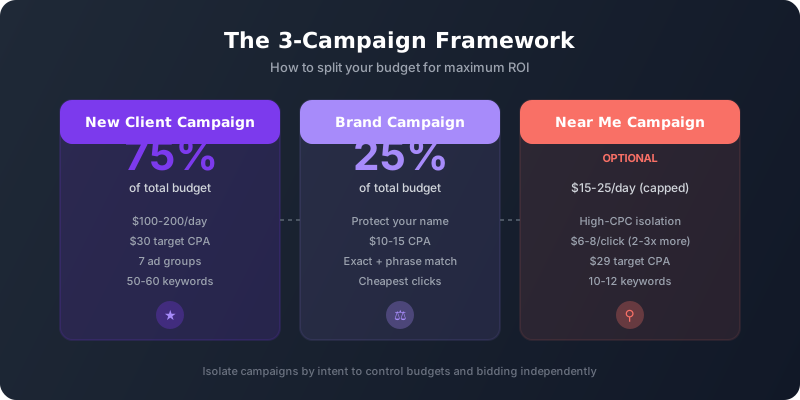
The biggest mistake is dumping all keywords into a single campaign. This makes it impossible to control budgets, bidding, or performance by intent level. Here's what works:
Campaign A: New Client Campaign (75% of budget)
Your workhorse campaign targeting people actively searching for grooming services in your area.
- Bidding: Maximize Conversions with a $30 target CPA
- Daily budget: $100-200/day depending on market size
- Geo-targeting: PRESENCE only (explained below)
- Ad schedule: 7:00 AM - 10:00 PM local time
- Landing page: Dedicated page with a clear offer — not your homepage
Campaign B: Brand Campaign (25% of budget)
Protects your salon name from competitors and captures people who already know you.
- Bidding: Maximize Conversions (no CPA cap needed — brand clicks are cheap)
- Daily budget: 25% of your main campaign spend
- Keywords: Your business name in exact and phrase match only
- Expected CPA: $10-15 (3x cheaper than generic campaigns)
Campaign C: Near Me Campaign (Optional — $15-25/day)
"Near me" keywords convert well but have 2-3x higher CPCs ($6-8/click vs $3-4 generic). Isolating them prevents your entire budget from being consumed by these expensive clicks.
- Bidding: Maximize Conversions with $29 target CPA
- Daily budget: $15-25/day (capped)
- Keywords: 10-12 phrase-match "near me" variations
Important: When you have a separate Near Me campaign, add these as negatives in your main campaign to prevent overlap:
- "near me" (phrase)
- "near you" (phrase)
- "in my area" (phrase)
- "nearby" (phrase)
- "local dog groomers" (phrase)
Want us to build this exact campaign structure for your salon?
We set up and manage Google Ads for groomers across the country — same framework, proven results.
Get a Free Account Audit2. Ad Group Organization
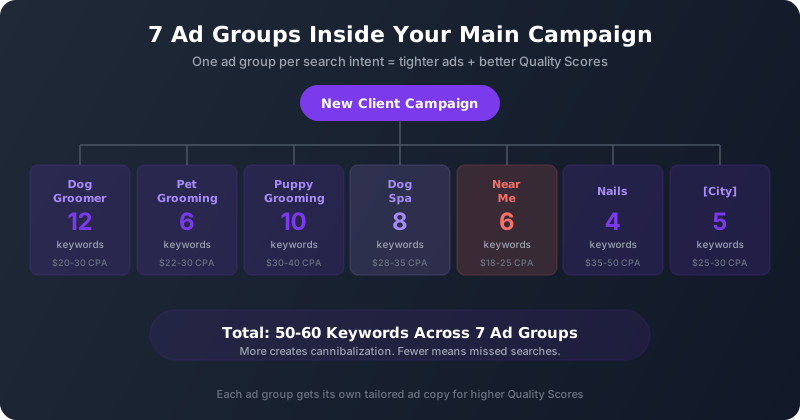
Inside your main campaign, organize keywords into these 7 ad groups. Each targets a different way people search for grooming:
Dog Groomer (10-12 keywords)
Your broadest grooming intent. Example keywords:
- "local dog groomer"
- "dog grooming services"
- "best dog groomer"
- "same day dog grooming"
- "dog grooming near me prices"
Pet Grooming (5-6 keywords)
Captures people who say "pet" instead of "dog":
- "pet grooming"
- "pet grooming near me"
- "best pet grooming near me"
- "[City] pet groomer"
Puppy Grooming (8-10 keywords)
New puppy owners are high-value — they become recurring clients:
- "puppy grooming prices"
- "puppy grooming services"
- "dog grooming for puppies"
- "puppy groomer"
- "puppy salon near me"
- "puppy grooming cost"
Dog Spa (6-8 keywords)
Premium-intent searchers willing to pay more:
- "dog spa"
- "spa for dogs"
- "dog salons near me"
- "dog spa near me"
Near Me (5-6 keywords)
Only include this ad group if you're NOT running a separate Near Me campaign:
- "dog grooming near me"
- "dog groomer near me"
- "groomer near me"
- "groomers near me"
Nails (3-4 keywords)
Low volume but ultra-specific intent:
- "dog nail trim"
- "dog nail cutter"
- "dog nail services"
[Your City] (3-5 keywords)
City-specific keywords that capture local intent:
- "[City] dog groomer"
- "dog grooming [City]"
- "best groomer in [City]"
3. Keyword Match Types
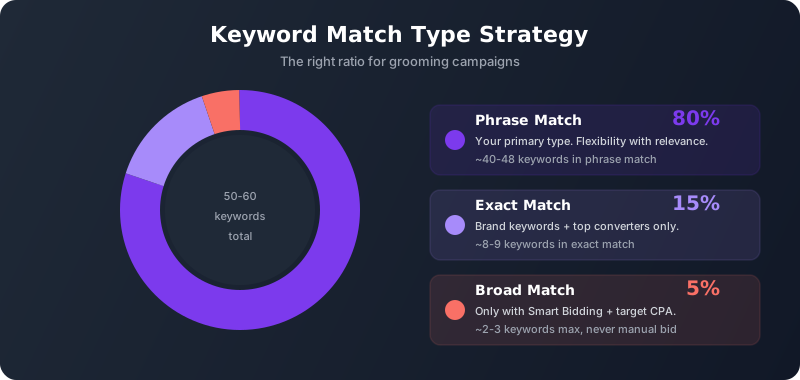
Here's what match type data tells us for grooming campaigns:
- Phrase match (80% of keywords): Your primary match type. Gives Google flexibility while keeping searches relevant.
- Exact match (15%): Brand keywords and your top converters only.
- Broad match (5%): Use sparingly and ONLY with Smart Bidding + target CPA. Never with manual bidding.
A typical grooming campaign should have 50-60 keywords total across all ad groups. More creates cannibalization. Fewer means you're missing searches.
4. The Negative Keyword Strategy That Saves 30%+ of Budget
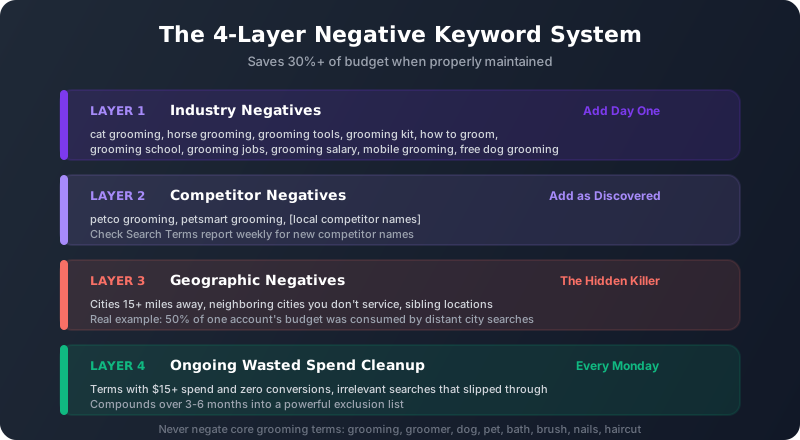
This is where most groomers leave money on the table. A proper negative keyword strategy has four layers:
Layer 1: Industry Negatives (Add Day One)
Searches that look like grooming but aren't your customer:
- "cat grooming" — unless you groom cats
- "horse grooming" / "bird grooming" / "rabbit grooming"
- "grooming tools" / "grooming kit" / "grooming supplies" — shoppers, not clients
- "how to groom" — DIY searchers
- "grooming school" / "grooming jobs" / "grooming salary" / "grooming certification" — industry people, not customers
- "mobile grooming" — unless you offer it
- "self service dog wash" — unless you have self-serve stations
- "free dog grooming" — freebie seekers don't convert
Layer 2: Competitor Negatives
Block searches for specific competitors (their CPA is usually terrible):
- "petco grooming"
- "petsmart grooming"
- Local competitor salon names in your area
Pro tip: Check your Search Terms report weekly. When competitor names appear, add them as phrase-match negatives immediately.
Layer 3: Geographic Negatives (The Hidden Budget Killer)
This is the most overlooked category. If you're in Scottsdale, you don't want "dog grooming Phoenix" or "dog grooming Tempe" — those searchers are too far away to become clients.
Add as broad-match negatives:
- Cities more than 15 miles from your salon
- Neighboring cities where you don't service
- Other locations your company serves (if multi-location) to prevent budget cannibalization
Real example: We audited an account in Colorado and found 50% of the budget was consumed by searches for surrounding cities 20-40 minutes away. Adding geographic negatives cut wasted spend by $300/month immediately.
Layer 4: Ongoing Wasted Spend Cleanup (Weekly)
Every week, pull your Search Terms report and look for terms with:
- $15+ spend and zero conversions
- High impressions but zero clicks (drags down Quality Score)
- Clearly irrelevant searches that slipped through
Add these as phrase-match negatives. Over 3-6 months this compounds into a powerful exclusion list that makes every dollar count.
The Golden Rule of Negative Keywords for Groomers
Never add a negative keyword that contains a core grooming term.
These words must NEVER appear inside any negative keyword phrase:
- grooming, groomer, groomers
- dog, pet, puppy
- bath, brush, nails, haircut
Why this matters: If you need to negate "dog grooming westlake" because Westlake is too far, add "westlake" as the negative — not the full phrase. Adding the full phrase as a negative could block legitimate searches.
Horror story: We audited an account that had added their own city name as a broad-match negative keyword. Their ads couldn't show for ANY search containing that city — which was basically every relevant query. They burned thousands before catching it.
We maintain negative keyword lists across dozens of grooming accounts. Let us handle yours.
Our automated systems catch wasted spend daily — not just on Mondays.
See What You're Wasting5. Geo-Targeting: The #1 Hidden Budget Waster
This is arguably the single most impactful setting in your account, and Google sets it wrong by default.
When you create a campaign, Google defaults location targeting to "Presence or Interest" — meaning ads show to people in your area AND people who merely "showed interest" in your area.
What this means in practice: Someone in New York searches "dog grooming Denver" for their upcoming trip. Google decides they have "interest" in Denver and shows them your ad. They click. You pay $4-7. They never walk in your door.
The fix: Change to "Presence only" — people physically in or regularly in your targeted locations.
Where to change it: Campaign Settings → Locations → Location Options → Target: "Presence: People in or regularly in your targeted locations."
This one change typically reduces wasted spend by 10-20% overnight.

Setting Your Target Area
- Best: Zip code targeting. Add every zip code within your realistic service radius (5-10 miles for most groomers). Maximum precision.
- Good: Radius targeting. Set a 5-7 mile radius from your salon. Simpler but less precise in metro areas.
- Acceptable: City + exclusions. Target your city, exclude neighboring cities that are too far.
Not sure if your geo-targeting is set correctly? We'll audit it free.
Most accounts we review have this set wrong — it's the single fastest fix for wasted spend.
Request Free Geo-Targeting Audit6. Budgets & Bidding
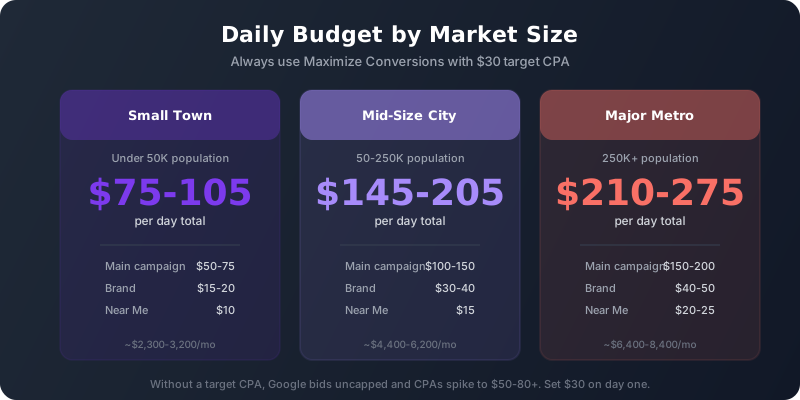
Daily Budget by Market Size
- Small town (under 50K pop): $75-105/day total ($50-75 main + $15-20 brand + $10 near me)
- Mid-size city (50-250K): $145-205/day total ($100-150 main + $30-40 brand + $15 near me)
- Major metro (250K+): $210-275/day total ($150-200 main + $40-50 brand + $20-25 near me)
Bidding Strategy
Always use Maximize Conversions with a target CPA. For most grooming markets, $30 is the sweet spot.
Without a target CPA, Google bids aggressively and CPAs spike to $50-80+. We've seen this in every single account running uncapped Maximize Conversions. Set it to $30 and leave it alone.
Performance Benchmarks
What to expect by ad group:
- Brand: 25-35% CTR, $2-4 CPC, $10-15 CPA
- Dog Groomer: 8-12% CTR, $3-4 CPC, $20-30 CPA
- Pet Grooming: 8-11% CTR, $3-4 CPC, $22-30 CPA
- Near Me: 15-20% CTR, $5-8 CPC, $18-25 CPA
- Dog Spa: 6-9% CTR, $3-5 CPC, $28-35 CPA
- Puppy Grooming: 6-9% CTR, $3-4 CPC, $30-40 CPA
- Nails: 3-6% CTR, $2-3 CPC, $35-50 CPA (often pause-worthy due to low volume)
- [City]: 8-12% CTR, $3-4 CPC, $25-30 CPA
If your Nails ad group has near-zero activity after 30 days, pause it. The search volume usually isn't there for standalone nail services.
7. Ad Copy That Converts
Headlines That Work
- Lead with city: "[City] Dog Groomer"
- Lead with price: "Dog Grooming From $XX"
- Urgency: "Same Day Dog Grooming"
- Social proof: "Top Rated [City] Groomer"
- Availability: "Book Online — Open 7 Days"
- Specificity: "Bath, Nails & Teeth — $XX"
Descriptions That Convert
- List services: "Bath, Nails, Teeth & Wellness Check Included"
- Convenience: "Curbside Drop-Off/Pick-Up Available"
- Differentiation: "Not Your Average Dog Groomer"
- CTA: "Book Your Appointment Online Today"
Required Ad Assets
- Sitelinks (4-8): Pricing, Services, Location, About, Book Online
- Callouts (8+): "Open 7 Days", "Same Day Appointments", "Professional Groomers", "Walk-Ins Welcome", "Book Online"
- Structured snippet: Service catalog listing your specific service options
- Call extension: Your phone number on every ad
- Promotion extension: First-visit discount or introductory offer
8. Conversion Tracking
You need three conversion actions minimum:
- Form submission — fires on your thank-you page AFTER someone submits the booking form (not on the form page itself)
- Phone calls from ads — tracks calls made from your ad's call extension. Set counting to "many per click" since multiple calls from the same person still indicate interest
- Lead form submissions — if using Google's native lead form extension
Critical detail: Your conversion must fire on the thank-you page, not the form page. We've seen salons tracking form pageviews as "conversions" — this inflates numbers and completely breaks Smart Bidding optimization.

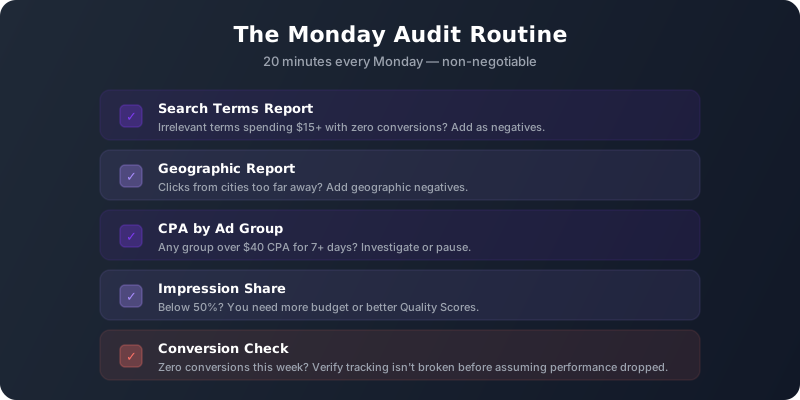
9. The Monday Audit Routine (20 Minutes)
Do this every Monday without fail:
- Search Terms Report: Any irrelevant terms spending over $15 with zero conversions? Add as negatives.
- Geographic Report: Clicks from cities too far away? Add geographic negatives.
- CPA by Ad Group: Any group over $40 CPA for 7+ days? Investigate or pause.
- Impression Share: Below 50%? You need more budget or better Quality Scores.
- Conversion Check: Zero conversions this week? Verify your tracking isn't broken before assuming performance dropped.
10. The 6 Budget Killers We See Repeatedly
1. No Target CPA Set
Without it, Google bids uncapped. CPAs spike to $60-80+ within days. Set $30 target CPA on day one.
2. Running Ads 24/7
Nobody books dog grooming at 2 AM. Schedule ads 7 AM - 10 PM and reallocate that overnight budget to peak hours.
3. Using "Presence or Interest" Targeting
Google's default. Change to "Presence only" immediately. This eliminates 10-20% of wasted clicks overnight.
4. Accidentally Negating Your Own Keywords
Broad-match negatives that contain words you're bidding on. One bad negative can silently kill your campaign. Audit monthly for conflicts.
5. Sending Traffic to Your Homepage
Your homepage has 15 calls to action competing for attention. A dedicated landing page with one clear offer converts 2-4x better.
6. Ignoring Cross-Location Overlap
If you have multiple locations in a metro, your campaigns compete against each other for the same searches. Add negative keywords for sibling cities to prevent self-cannibalization.
Implementation Priority
If you're starting from scratch or fixing a broken account, do these in order:
- Fix geo-targeting to PRESENCE only
- Set $30 target CPA on all campaigns
- Add the industry negative keyword list
- Set ad schedule to 7 AM - 10 PM
- Restructure into the 3-campaign framework
- Organize keywords into the 7 ad groups
- Add geographic negatives for distant cities
- Set up proper conversion tracking
- Build a dedicated landing page
- Start your weekly Monday audit routine
The difference between a groomer burning $3,000/month with nothing to show for it and one filling their appointment book comes down to structure, negative keywords, and weekly maintenance. None of this is complicated — it just requires discipline and consistency.