How to Read Your Google Ads Search Terms Report (Groomer Edition)
The Search Terms report is the most important report in your Google Ads account. It shows you the actual searches people typed before clicking your ad — not the keywords you're bidding on, but what people really searched for.
Checking this report weekly is how you stop wasting money and find new opportunities. Here's exactly how to read it and what to do with what you find.
How to Find It
- Log into Google Ads
- Click "Insights and reports" in the left sidebar
- Click "Search terms"
- Set date range to "Last 7 days" (for weekly review) or "Last 30 days" (for monthly deep dive)
- Sort by "Cost" descending — highest spend first
You're now looking at every actual search query that triggered your ads, how much you spent on each, and whether any of them converted.
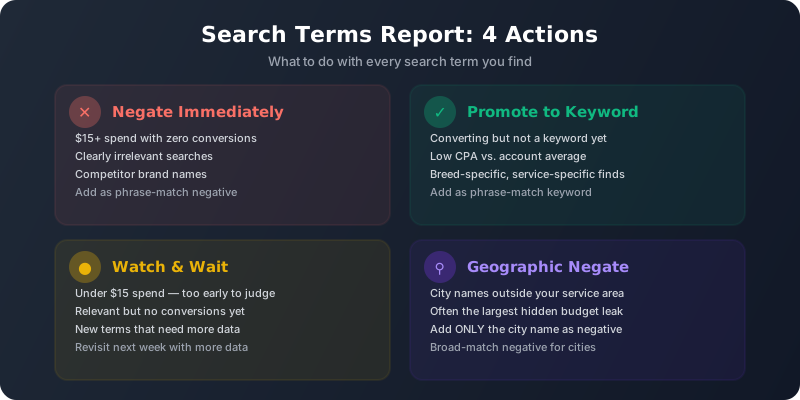
The 4 Things You're Looking For
1. Wasted Spend (Negate Immediately)
Look for search terms with: $15+ spend and zero conversions.
These are searches that cost you money but never resulted in a booked appointment. Common culprits for groomers:
- "dog grooming school near me" — student, not client
- "petco grooming appointment" — they want Petco specifically
- "how to groom a poodle at home" — DIYer
- "dog grooming [far away city]" — outside your service area
- "dog grooming jobs" — job seeker
Action: Add these as phrase-match negative keywords. This prevents your ad from showing for similar searches in the future.
2. Geographic Waste (Often the Biggest Leak)
Look for city names in search terms that are outside your service area. If your salon is in Scottsdale, searches like "dog grooming Phoenix" or "dog grooming Mesa" might be triggering your ads and eating budget.
Action: Add the distant city name as a broad-match negative. Just the city name — not the full phrase.
3. Converting Terms You're Not Targeting (Promote)
Look for search terms that ARE converting (1+ conversions) but aren't one of your existing keywords. These are opportunities.
Common discoveries:
- Breed-specific searches: "goldendoodle grooming [city]"
- Service-specific: "dog teeth cleaning near me"
- Urgency: "same day dog grooming"
- Questions turning into bookings: "dog grooming prices [city]"
Action: Add these as phrase-match keywords in the relevant ad group. They're already converting — give them dedicated bids and ads.
4. High-Impression, Low-Click Terms (Quality Score Drag)
Look for terms with high impressions but very low CTR (under 2%). These terms are showing your ad but nobody's clicking. This drags down your Quality Score, which increases CPCs across your account.
Action: If the term is irrelevant, negate it. If it's relevant but your ad doesn't match well, consider creating a new ad group with tailored ad copy for that intent.
Weekly Review Process (15 Minutes)
- Open Search Terms report → Last 7 days → Sort by Cost (highest first)
- Scan the top 20-30 terms by spend
- Any term with $15+ spend and 0 conversions? Add as negative.
- Any city names outside your service area? Add city as negative.
- Any converting terms you're not bidding on? Add as keyword.
- Any high-impression / zero-click terms? Negate if irrelevant.
That's it. 15 minutes every Monday. Over 3-6 months, this single habit will reduce your wasted spend by 30-40% and surface keywords you'd never have thought to bid on.
Real Examples From Grooming Accounts
Example 1: Geographic waste
A salon in Colorado Springs found that "dog grooming Denver" (60 miles away) had consumed $340 in the past month with zero conversions. Adding "Denver" as a negative saved $340/month immediately.
Example 2: Competitor bleed
The search term "petsmart grooming prices near me" appeared with $89 spend and zero conversions. People searching for Petsmart specifically aren't comparing — they want Petsmart. Added as negative.
Example 3: Hidden gem
"Labradoodle grooming [city]" was converting at $18 CPA — better than the account average of $27. This term wasn't a keyword. We added it as a phrase-match keyword in a new "Breed-Specific" ad group with tailored ad copy mentioning doodle grooming specifically. CPA dropped to $14.
Don't have time to review search terms every week? That's literally what we do — our automated systems flag wasted spend daily across every account we manage.
Let Us Handle Your AccountCommon Mistakes When Reading Search Terms
- Negating too aggressively — Don't negate a term after just $5 in spend. Give it $15-20 before deciding. Small sample sizes mislead.
- Negating converting terms — Always check the Conversions column before negating. A term might look irrelevant but still convert.
- Forgetting the golden rule — Never add a negative that contains core grooming words (grooming, groomer, dog, pet, bath, nails, etc.)
- Only checking monthly — Weekly catches waste faster. A bad search term can burn $100+ in a month if you only check once.
- Not adding positive keywords — Most people only use this report for negatives. The converting terms you're not targeting are free money sitting on the table.
The Search Terms report is where the real optimization happens. Campaign structure and keyword selection are setup tasks you do once. Search term review is the ongoing discipline that separates accounts burning money from accounts printing clients.