Multi-Location Google Ads: How to Stop Your Salons From Competing Against Each Other
You have 3 grooming locations across a metro area. Each location runs Google Ads. Someone searches "dog grooming near me" — and all three of your locations bid against each other for that same click. You're competing with yourself, driving up your own CPCs.
This is the most expensive mistake multi-location groomers make. Here's how to fix it.
The Problem: Self-Cannibalization
When multiple locations target the same geographic area without proper boundaries:
- Your locations bid against each other in the same auction
- CPCs increase because Google sees multiple bids from the same advertiser
- Budget is consumed by internal competition instead of external competition
- Performance data is split across accounts/campaigns, making optimization harder
- You have no control over which location shows for which searches
In one multi-location account we audited, 35% of Location A's budget was consumed by searches closer to Location B. Both locations were paying premium CPCs to show for the same queries.
The Fix: Geographic Boundaries
Step 1: Define each location's territory
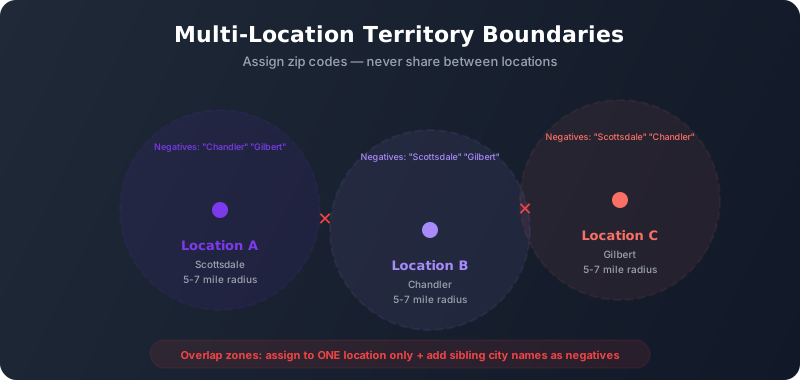
Draw a boundary around each location. Use zip codes — they're the most precise targeting option:
- Location A: Zip codes within 5-7 miles of salon A
- Location B: Zip codes within 5-7 miles of salon B
- Location C: Zip codes within 5-7 miles of salon C
Where territories overlap (zip codes equidistant from two locations), assign to one location only. Don't share zip codes between campaigns.
Step 2: Negative keywords for sibling locations
In each location's campaign, add the OTHER locations' city names/neighborhoods as negative keywords:
- Location A (Scottsdale) negatives: "Chandler," "Gilbert" (where B and C are)
- Location B (Chandler) negatives: "Scottsdale," "Gilbert"
- Location C (Gilbert) negatives: "Scottsdale," "Chandler"
This prevents Location A's campaign from triggering on "dog grooming Chandler" even if the searcher happens to be in a shared zip code.
Step 3: Location-specific ad copy
Each location's ads should reference its specific city/neighborhood:
- Location A headline: "Dog Grooming in Scottsdale"
- Location B headline: "Chandler Dog Groomer"
- Location C headline: "Gilbert Dog Grooming"
This improves Quality Score (ad matches search query better) and improves CTR (searcher sees their city name).
Account Structure Options
Option A: One account, separate campaigns per location
Best for: 2-5 locations under one ownership
- One Google Ads account
- Separate campaign per location with its own budget
- Location-specific geo-targeting per campaign
- Shared negative keyword lists applied across all campaigns
Advantage: Easier to manage, shared conversion data helps Smart Bidding learn faster.
Option B: Separate accounts per location (under MCC)
Best for: 5+ locations, franchises, or locations with very different budgets
- Manager account (MCC) umbrella
- Individual account per location
- Each account has its own billing, budget, and conversion tracking
Advantage: Clean reporting per location, no budget sharing, independent optimization.
Budget Allocation Across Locations
Don't split budget evenly. Allocate based on:
- Market size — A location in a 500K metro needs more budget than one in a 50K town
- Competition density — More competitors = higher CPCs = more budget needed for same impression share
- Capacity — If Location B only has 2 groomers while Location A has 5, don't give B the same budget. Match budget to capacity.
- Performance — After 30 days of data, shift budget toward locations with lower CPA and higher conversion rates
Monitoring Cross-Location Overlap
Even with proper setup, overlap creeps back in. Monthly check:
- Pull Search Terms report for each location's campaign
- Look for other locations' city names appearing in the terms
- Check Geographic report — are clicks coming from outside the assigned territory?
- Compare CPCs across locations — if one location's CPCs are spiking, check for internal competition
We manage Google Ads across multi-location grooming businesses — preventing overlap, optimizing per-location, and maximizing every dollar across your network.
Get a Multi-Location AuditCommon Multi-Location Mistakes
- Using radius targeting with overlap — Two 10-mile radiuses from locations 8 miles apart = massive overlap zone. Use zip codes instead.
- Shared budgets — Google's shared budgets allocate unpredictably. Give each location its own daily budget.
- One landing page for all locations — Each location needs its own landing page with its address, hours, and team. Generic multi-location pages don't convert as well.
- Ignoring new location ramp-up — New locations need 30-60 days of higher budget to build conversion history for Smart Bidding. Don't expect Day 1 performance from a brand-new campaign.
Multi-location Google Ads is where most grooming businesses bleed money without realizing it. The fix is structural — proper geographic boundaries, sibling-location negatives, and per-location budgets. Once the structure is right, each location operates as its own optimizable unit instead of fighting its siblings for the same clicks.